

YouTube offers a variety of privacy features designed to help users control who can view their videos. Whether you're a content creator wanting to keep certain videos private or simply someone keen on maintaining a low profile, understanding these privacy settings can help enhance your experience. In this section, we'll delve into the different ways YouTube safeguards your videos and how you can take advantage of these options to protect your content from unwanted eyes.
Understanding YouTube's Privacy Settings
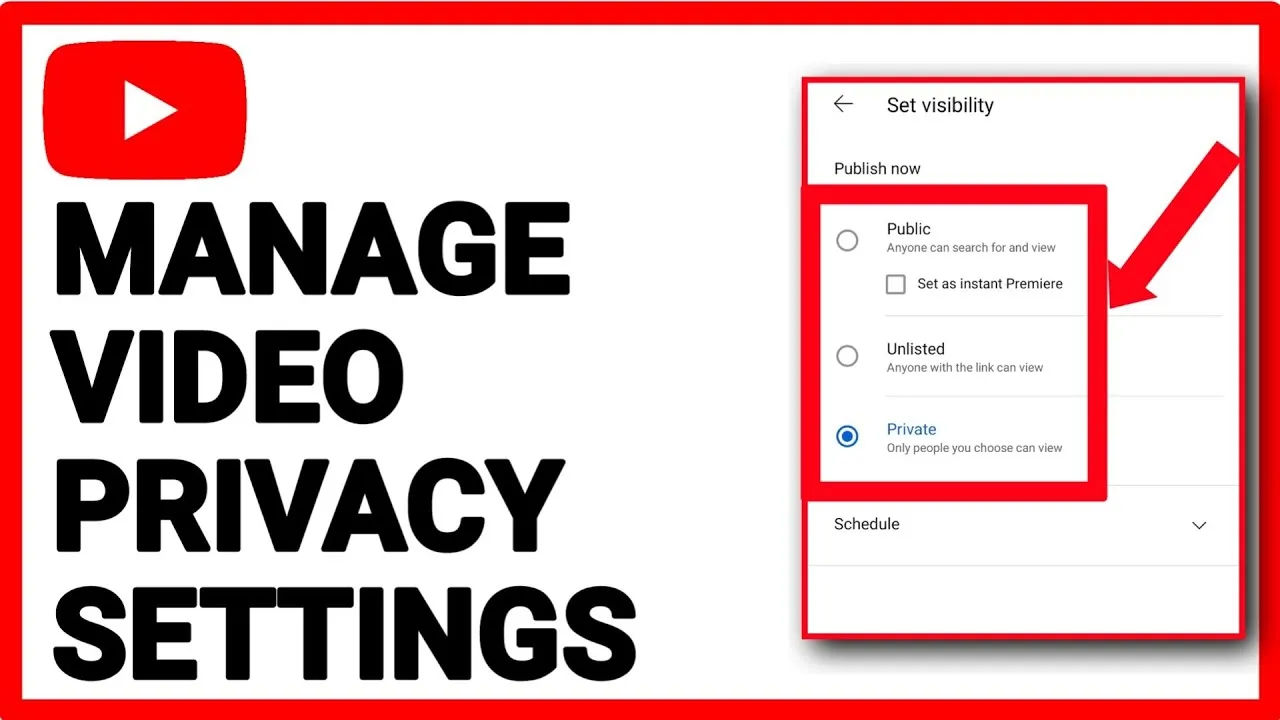
YouTube provides several privacy settings to help you manage how your videos are shared and viewed. Here's a breakdown of the primary options:
- Public: When a video is set to public, anyone can view it. This is the default setting for videos and is ideal for content creators looking to reach a broad audience.
- Unlisted: Unlisted videos are a stepping stone between public and private. They won’t appear in search results or video suggestions, meaning only those with the link can view them. This setting is perfect for sharing videos with a select group without making them fully private.
- Private: A private video can only be viewed by you and the users you select to share it with. To share a private video, you need to add their email addresses associated with their YouTube accounts. This is the best option for sensitive content or personal videos.
Here's a quick comparison of these settings:
| Setting | Visibility | Sharing Options |
|---|---|---|
| Public | Everyone | No restrictions |
| Unlisted | Only with link | Shared via link only |
| Private | Selected users | Only invited users |
By familiarizing yourself with these settings, you can better manage your content and safeguard your privacy on YouTube. Remember, each setting serves a unique purpose, so choose the one that best fits your needs!
Also Read This: How to Hyperlink in LinkedIn Post for Better Engagement
5. How to Use Third-Party Tools for Password Protection
When it comes to enhancing privacy for your YouTube videos, third-party tools can step in to save the day. While YouTube itself doesn't offer a direct password protection feature, there are several reliable services that provide additional layers of security. Let’s explore some options and how you can utilize them.
One popular method is to use platforms designed for sharing video content securely. Here’s a brief overview of some well-regarded tools:
- Vimeo: Beyond just being a video hosting service, Vimeo offers privacy controls, including password protection, allowing you to restrict who can view your videos.
- Wistia: This is another platform that provides password protection alongside analytics and customization options, making it great for businesses.
- Vidyard: Primarily aimed at marketers, Vidyard also offers password protection and extensive sharing features.
To use these tools, follow these steps:
- Sign up for the platform of your choice.
- Upload the video you want to protect.
- Navigate to the privacy settings of your video.
- Select the option for password protection and set your desired password.
- Share the video link along with the password to your intended audience.
Using these third-party tools can significantly improve your control over who accesses your content while still allowing you to share your videos effectively.
Also Read This: Reverse a YouTube Playlist and Restore Your Watch History
6. Steps to Securely Share Video Links
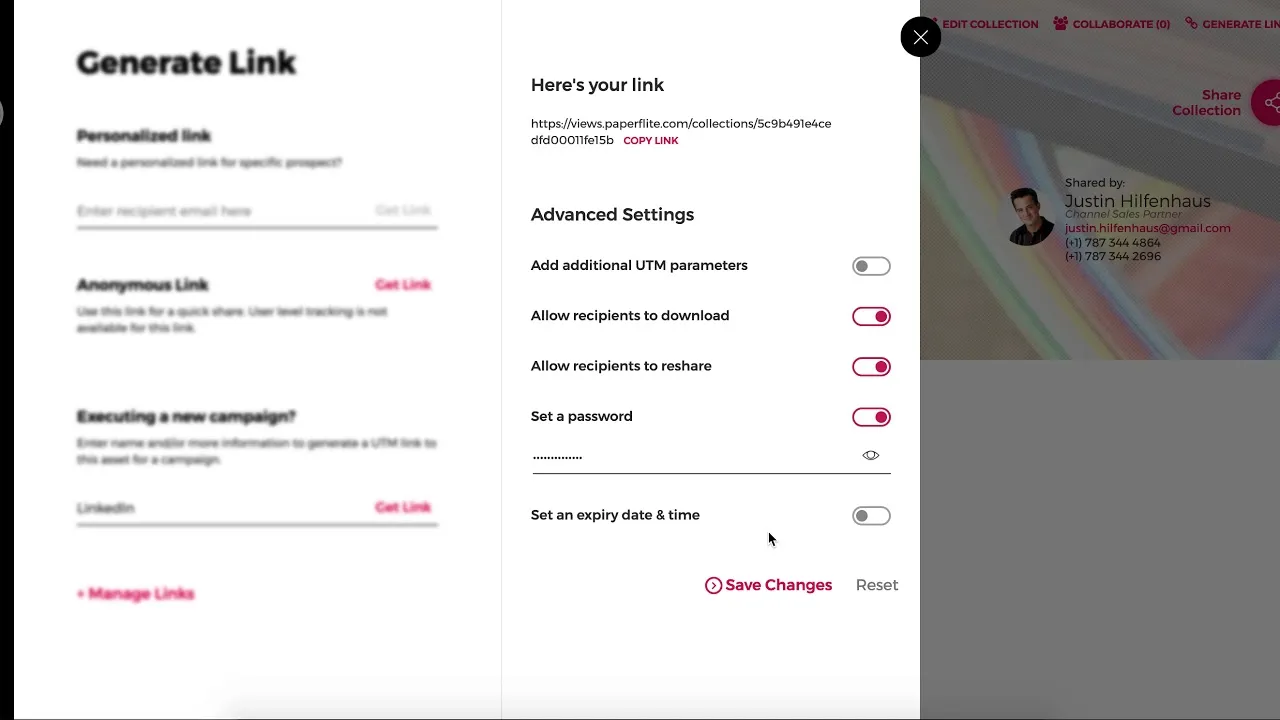
Sharing video links securely is essential in maintaining your content's privacy. Even when you use third-party tools or the privacy settings available on YouTube, it’s vital to be mindful of how you distribute the links. Let’s break down the steps you should follow to ensure your video links remain secure.
- Choose the Right Platform: Before sharing, ensure that the platform or tool you’re using allows for secure sharing and has the privacy settings you need.
- Create a Strong Password: If your video is password-protected, make sure to use a strong password that’s not easily guessable. A mix of upper and lower case letters, numbers, and special characters is ideal.
- Use Encrypted Messaging: When sharing the link and password, consider using encrypted messaging applications like Signal, WhatsApp, or even secure email services that prevent unauthorized access.
- Limit Sharing: Only share the link with those who absolutely need access. Be wary of public forums or social media unless you're comfortable with the risks involved.
- Monitor Access: If your chosen platform allows, keep an eye on who is accessing your video. Some services provide analytics that can help you track this.
By following these steps, you can ensure that your video sharing is as secure as possible, allowing you to maintain better control over your content and who gets to see it.
Also Read This: How to Go Live on Behance
7. Implications of Password Protecting Videos
Password protection on YouTube videos comes with several implications that are essential to consider, especially if you're leaning toward controlling who sees your content. Let's explore what you might need to keep in mind:
- Privacy Enhancement: Password protection can significantly enhance privacy. It ensures that only individuals with the password can access your content, effectively shielding it from the public eye.
- Limited Audience: While this feature provides a layer of security, it also limits your audience. If you’re trying to reach a broader public, password protection might not be the best approach, as it can deter casual viewers.
- User Experience: Inputting a password can be an extra step that may annoy some viewers. If your content’s goal is to attract a wide audience, think about whether this barrier will affect engagement.
- Content Sharing: Sharing videos with specific groups can be cumbersome. You’ll have to communicate the password separately, which can lead to confusion if your audience isn’t tech-savvy.
- Security Risks: While passwords add a layer of security, they might also create risks if not managed properly. Weak passwords can be easily guessed, and sharing them inappropriately can lead to unauthorized access.
- Content Management: You’ll need a clear system for managing who has access and keeping track of passwords. If you forget to share or recall a password, you risk losing valuable audience engagement.
Overall, while password protecting your YouTube videos can be beneficial for privacy, it’s also crucial to consider how it impacts your audience's experience and accessibility.
Also Read This: Where to Watch the Classic Holiday Special How the Grinch Stole Christmas 1966 on YouTube
8. Alternatives to Password Protection on YouTube
If you’re not fully convinced that password protecting your YouTube videos is the right route, there are alternative methods to control privacy and access. Here are some effective strategies:
- Unlisted Videos: By setting your videos to "Unlisted," they won’t show up in popular searches or on your channel. Only people who have the direct link can view the video, offering a middle ground for privacy.
- Private Videos: Choose the "Private" option if you want to share your videos with specific users. This means only invited people can view the content. While this limits viewership, it ensures strict control over who accesses your videos.
- Channel Members Only: If you have a YouTube channel with a membership option, you can create exclusive content that’s accessible only to your paying members. This not only protects your videos but can also generate revenue.
- Use Other Platforms: Consider other platforms like Vimeo or private video hosting services that offer robust password protection and privacy settings if YouTube doesn't quite meet your needs.
By exploring these alternatives, you can strike the right balance between sharing your content and maintaining the level of privacy you desire. Every approach has its pros and cons, so choose the method that aligns best with your goals!
Also Read This: How to Add Your Resume on LinkedIn
9. Best Practices for Maintaining Privacy on YouTube
Maintaining your privacy on YouTube is essential, especially if you’re sharing personal content or sensitive information. Here are some best practices to help you protect your privacy on the platform:
- Limit Video Visibility: When uploading videos, consider the settings. You can choose between Public, Unlisted, and Private. If you want more control, use Unlisted for sharing with a select group and Private for total exclusivity.
- Be Mindful of Metadata: Check what details you include in your video metadata. This includes titles, descriptions, and tags as these can often reveal more than you'd like.
- Disable Comments: If you're concerned about unwanted feedback or harassment, consider disabling comments on your videos to avoid public engagement.
- Review Privacy Settings: Regularly visit your YouTube settings to ensure that you are aware of and comfortable with your privacy options. Adjust your notification, subscription, and playlist settings to limit information sharing.
Additionally, consider the following:
| Privacy Feature | Description |
|---|---|
| Two-Factor Authentication | Enable this for your account to add an extra layer of security. |
| Regularly Update Your Password | Change your password periodically to enhance security. |
| Be Cautious with Live Streams | Think twice before live streaming as it can expose your location and surroundings in real-time. |
By following these best practices, you can better control what information you share and maintain your privacy on YouTube.
10. Conclusion and Final Thoughts
Understanding how to manage your privacy on YouTube is more important than ever. With millions of users and an ever-expanding audience, knowing how to protect your content can save you from potential issues down the road.
While YouTube doesn't provide a direct option to password-protect videos, utilizing the platform's privacy settings can help safeguard your content in meaningful ways. Here are some key takeaways:
- Use Unlisted or Private settings for sensitive videos.
- Regularly review your privacy settings to ensure you're comfortable with how you're sharing information.
- Educate yourself on the implications of metadata that accompanies your uploads.
- Consider using external platforms if password protection is a must for your content.
Ultimately, while some might find the lack of a password protection feature limiting, being savvy about your upload choices can provide a significant level of privacy. Take your time to explore all the options available, and don’t hesitate to reach out to the community or forums for advice and best practices. Your content is valuable, and it’s worth taking the necessary steps to protect it.