

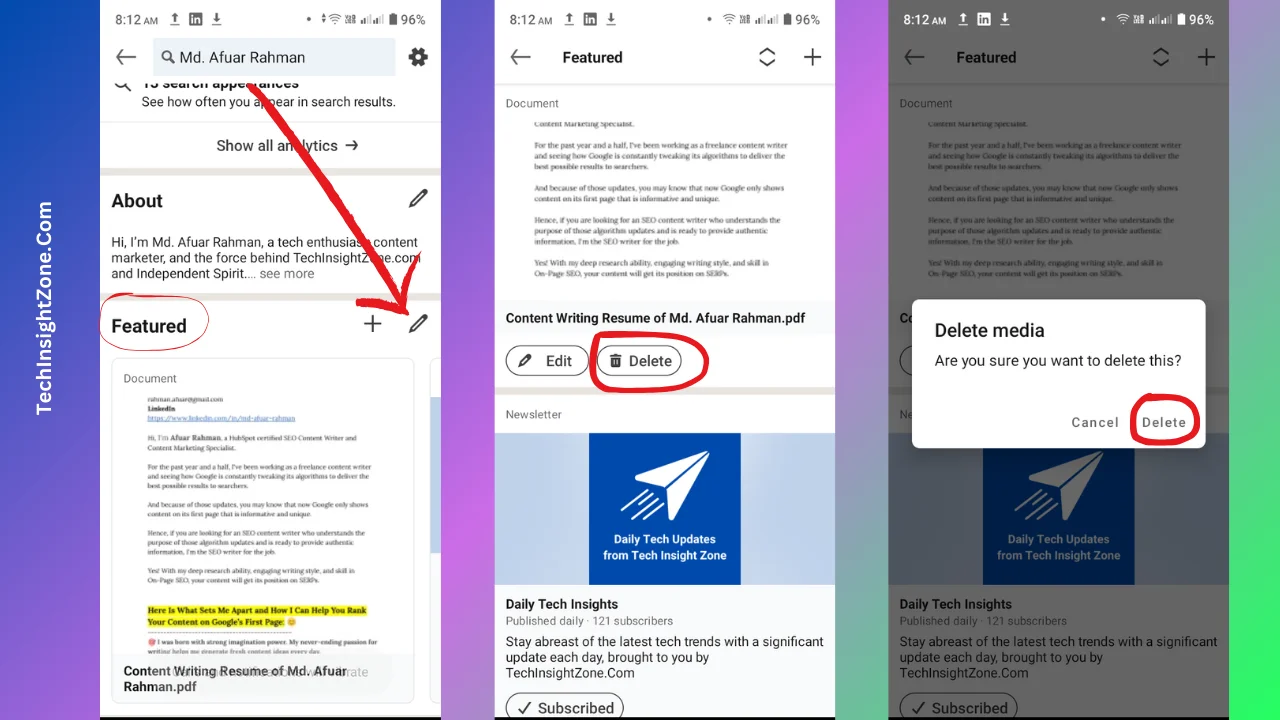
Having a polished LinkedIn profile is more important than ever in today's digital job market. Think of your LinkedIn as your online business card; it's often the first impression recruiters and potential employers get of you. So, you want it to present the best version of yourself!
A clean profile does several things. First, it enhances your professional image. When your profile is clutter-free and up-to-date, it signals to others that you are organized and serious about your career. Don't just take my word for it; statistics show that recruiters spend an average of only six seconds reviewing a profile. This means you have a very short window to make a great impression!
Additionally, having your most relevant experiences and skills highlighted can improve your visibility in searches. LinkedIn’s algorithm favors profiles that are complete and consistent, so keeping your information up-to-date can help you appear in more search results. It's really about maximizing your opportunities!
Furthermore, a clean LinkedIn profile helps you network more effectively. When your interests and expertise are clearly presented, you're more likely to attract connections with similar professional backgrounds or goals. Remember, networking is a two-way street—others will want to connect with you if your profile reflects your true, current self.
In summary, a tidy LinkedIn profile is essential for:
- Creating a strong first impression
- Increasing your visibility to recruiters
- Attracting meaningful professional connections
Identifying Old Resumes and Outdated Information
Before diving into the cleaning process, it’s crucial to identify the outdated pieces of information that may be lingering on your LinkedIn profile. This step not only helps in presenting a more accurate version of you but also allows you to strategize on how to position yourself in your industry.
Here’s how you can effectively pinpoint what needs to go:
- Review Your Profile Thoroughly: Start by doing a complete sweep of your LinkedIn profile, focusing on sections like your summary, experience, education, and skills. Are there older job titles that don’t accurately reflect your current role? Are there skills that are no longer relevant?
- Check Dates and Details: Look at the dates associated with each position. If you’re listing a job that ended several years ago but haven’t updated your status, it’s time to reconsider. Your recent experiences should take precedence.
- Take Stock of Your Skills: LinkedIn allows you to list multiple skills. However, those skills should accurately reflect your current capabilities. Are there skills listed that you no longer use or that have been replaced by new ones? If so, it’s time for an update!
- Get Feedback: Sometimes, we miss things because we’re too close to them. Consider asking a trusted colleague or mentor to review your profile. They might catch outdated information that you’ve overlooked.
Once you have identified the outdated information, you’re ready to make the necessary changes. A cleaner profile will not only serve you better in your job search but will also reflect your professional growth accurately.
Also Read This: How to Link Behance to LinkedIn
Updating Your LinkedIn Profile After Removal
Once you've successfully removed those outdated resumes from your LinkedIn profile, it's time to focus on making your profile shine! An updated profile not only reflects your current skills and experiences but also makes a great impression on potential employers or connections.
Here are some steps you can take to update your LinkedIn profile effectively:
- Revise Your Summary: This is your chance to tell your professional story. Update your summary to highlight recent achievements, skills, and goals. Keep it engaging and reflective of your current professional identity.
- Showcase Relevant Experiences: Add any new roles or projects you've taken on since your last update. Focus on details that align with your career aspirations and make sure to include quantifiable achievements.
- Update Your Skills: With industries constantly evolving, your skills may need an refresh. Add new skills and remove any that are no longer relevant. This not only helps recruiters find you but also keeps your profile competitive.
- Engage with Content: Share articles, comment on posts, or write your own updates to keep your profile active. Engaging with content helps you appear on others' feeds and increases your visibility.
- Request Recommendations: Reach out to colleagues or mentors for recommendations that speak to your current abilities. These testimonials can significantly enhance your credibility.
Remember, your LinkedIn profile is a living document, so don’t hesitate to revisit and update it regularly!
Also Read This: Don't Let Me Down by Kurt Hugo: Watch the Performance
Best Practices for Maintaining a Professional LinkedIn Presence
Maintaining a polished LinkedIn presence is crucial for networking and job searching. Following best practices can help you stand out while representing your professional brand effectively. Here are some tried-and-true strategies:
| Best Practice | Description |
|---|---|
| Consistent Personal Branding | Use a professional photo, maintain a uniform tone in your posts, and ensure your summary aligns with your career goals. |
| Regular Updates | Keep your profile current by regularly adding new skills, experiences, and accomplishments. |
| Networking Actively | Connect with professionals in your industry, engage with their content, and expand your network regularly. |
| Join Relevant Groups | Participate in groups related to your industry. This is a great way to share insights and learn from others. |
| Personalized Connection Requests | When sending connection requests, always personalize the message to make a meaningful first impression. |
By adhering to these best practices, you’ll create an impactful LinkedIn profile that not only attracts the right opportunities but also reflects your professional integrity.
Also Read This: How to Create Dynamic Posts on Behance Engaging Your Audience with Interactive Content
7. Utilizing LinkedIn Features for Job Seeking
LinkedIn isn’t just a digital resume; it’s a powerful networking platform designed to enhance your job search experience. Let’s dive into some fantastic features that can give you an edge in your job-seeking journey:
- Job Alerts: Set up job alerts based on your desired position, location, and industry. LinkedIn will notify you of new listings that match your criteria, ensuring you never miss an opportunity.
- Easy Apply: Many job postings on LinkedIn have an "Easy Apply" button. This feature allows you to submit your application directly through the platform with just a few clicks, streamlining your application process.
- Networking Opportunities: Use LinkedIn's "People You May Know" feature to expand your network. Connecting with industry professionals can lead to job referrals and insider information about positions.
- LinkedIn Learning: Enhance your skills with LinkedIn Learning. It offers a plethora of courses that you can take to make your profile shine, showcasing your dedication to personal and professional growth.
- Recommendations and Endorsements: Highlight your skills and expertise by requesting recommendations from colleagues and supervisors. These testimonials not only validate your experience but also enhance your credibility.
- Customizable Profile Visibility: Adjust who can see your profile and activity. Make sure it’s visible to recruiters while maintaining the right level of privacy with personal connections.
By leveraging these features, you can not only enhance your visibility but also streamline your job search effectively.
8. Conclusion and Final Tips for a Polished Profile
Cleaning up your LinkedIn profile and removing old resumes is an essential step towards creating an impressive online presence. Here are some final tips to ensure your profile is polished and professional:
- Regular Updates: Just like your resume, your LinkedIn profile needs regular updates. Add new skills, job experiences, and accomplishments as they occur.
- Profile Picture: Use a recent, high-quality headshot. It should be professional yet approachable, as a good picture can significantly enhance your profile.
- Engage with Content: Share relevant articles or posts that resonate with your industry. Engaging with content shows you’re active and interested in your field.
- Optimize for Keywords: Use industry-specific keywords in your profile summary and job descriptions. This optimization helps recruiters find you during searches.
- Proofread: Errors can undermine your professional image. Make sure to proofread your profile for any typos or grammatical errors.
In conclusion, a clean and well-structured LinkedIn profile can make a significant difference in your job search. By utilizing LinkedIn features and following these final tips, you'll not only impress potential employers but also enhance your networking possibilities. Happy job hunting!