

When it comes to professional networking, LinkedIn is an essential tool that can open doors to new opportunities. One of the key components of your LinkedIn profile is the "Experience" section. This part showcases your work history, skills, and achievements, giving potential employers or collaborators a snapshot of your professional journey. In this guide, we'll walk you through the step-by-step process of adding your experience on
Understanding the Importance of Experience on Your Profile
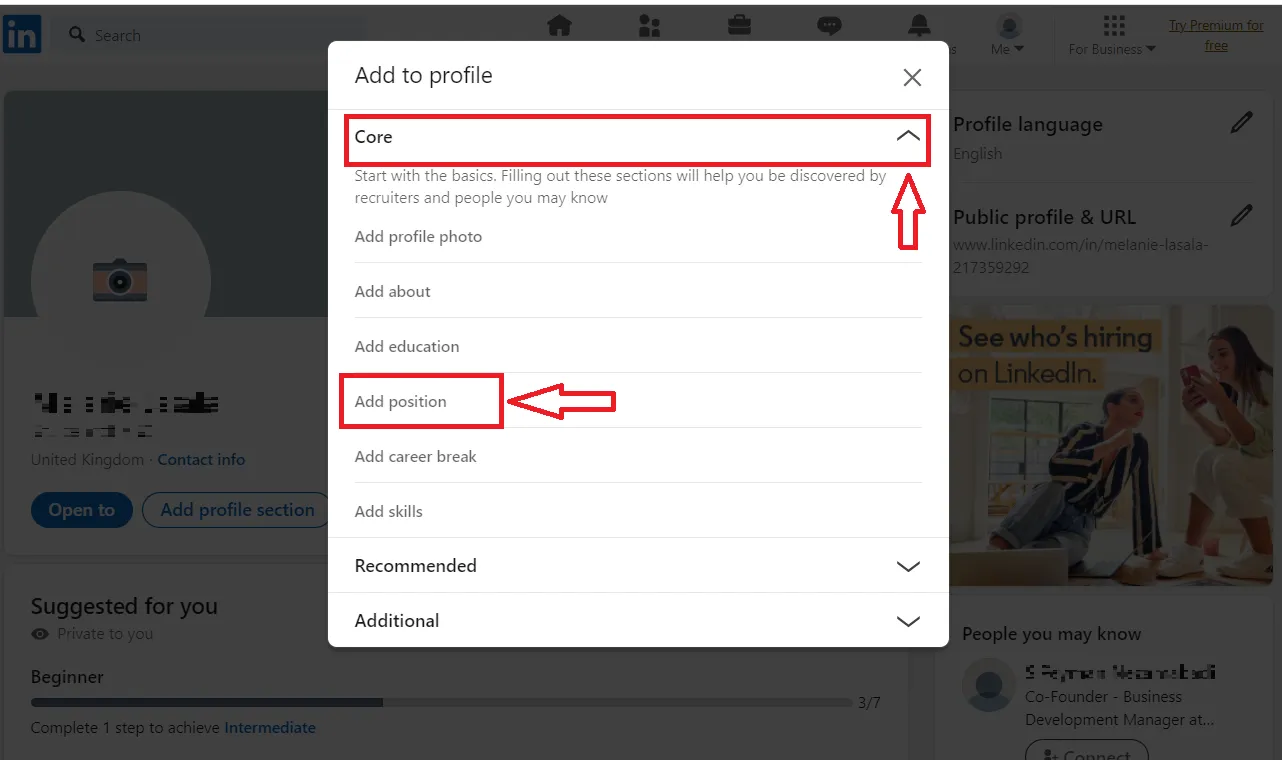
So, why is the "Experience" section so crucial on LinkedIn? Here are a few key reasons:
- First Impressions Matter: When a recruiter or potential connection views your profile, your experience is often the first thing they notice. A well-crafted experience section can create a positive impact right away.
- Showcasing Your Skills: Adding detailed descriptions of your roles allows you to highlight specific skills and accomplishments. This not only demonstrates your expertise but also aligns with job descriptions for positions you're interested in.
- Building Your Network: When you add experience, it helps you connect with others in your field. Colleagues and fellow alumni can find you based on shared experiences, which can lead to valuable networking opportunities.
- Attracting Recruiters: Many recruiters use LinkedIn to search for candidates. Having a complete experience section, filled with relevant keywords and accomplishments, increases your chances of being found.
- Storytelling: Your work history tells a story about your career progression and professional growth. It can highlight not just what you've done, but also how you've developed your skills over time.
In short, a thorough and well-presented experience section is a powerful tool. Not only does it enhance your personal brand, but it also positions you as a desirable candidate to prospective employers, making it essential to get right. Let's explore how to make your experience shine on LinkedIn!
h2>Navigating to the Experience Section
Alright, let’s dive into the first step of adding your experiences to LinkedIn: finding the Experience section! It might seem simple, but knowing exactly where to look can save you time and make the process much smoother.
When you log into your LinkedIn account, you’ll land on your homepage. Here’s how to find the Experience section:
- Your Profile: Click on your photo or your name at the top of the page. This action directs you to your profile.
- Scroll Down: Once on your profile, scroll down until you reach the “Experience” section. It’s usually located right below the “About” section. If you haven’t added any experiences yet, you may not see this section at all; don’t worry—there’s an easy fix!
- Add Section Button: If the Experience section isn’t visible, look for an “Add profile section” button. It’s often found in the top-right corner. Click it, then select “Add experience” from the dropdown menu.
And voila! You’re now in the Experience section where you can showcase your professional journey. It’s a great insight for potential employers and connections to see where you’ve been and what you’ve accomplished!
Also Read This: Understanding YouTube Subscription Glitches
Step-by-Step Process for Adding New Experience
Now that you’ve navigated to the Experience section, let’s get into the nitty-gritty of adding new experiences. Follow these steps to ensure you highlight your skills and job history effectively.
- Click the + icon: In the Experience section, you’ll see a small “+” icon or an “Add experience” button. Click on it.
- Fill Out the Details: A form will pop up, asking for various details:
- Job Title: Enter your job title or position held.
- Company Name: Type in the name of your employer. If it’s a well-known company, LinkedIn may auto-suggest it; just click their name!
- Location: This can be a city, state, or country, depending on where you worked.
- Time Period: Specify when you started and ended the role. If you’re currently in the position, be sure to check the “I currently work here” box.
- Description: This is your chance to shine! Write a brief overview of your responsibilities, achievements, and skills. Remember to use action verbs and quantifiable results where possible.
- Settings: Decide whether you want to let your network know about this update. There’s usually a checkbox for this. Toggle it based on your preference.
- Save: Finally, when you’ve filled everything out, hit the “Save” button at the bottom. Congratulations! Your experience is now added to your profile.
Once you’ve completed these steps, make sure to review your profile as it appears to others. This will help you ensure everything looks exactly how you want it to be showcased!
Also Read This: Creating an Engaging Carousel Post on LinkedIn
Tips for Writing Effective Experience Descriptions
Writing compelling experience descriptions on your LinkedIn profile can make a significant difference in how potential employers perceive you. It's your chance to showcase your skills and achievements. Here are some effective tips:
- Start with a Strong Action Verb: Begin each bullet point with a strong action verb. For example, use “Led,” “Developed,” or “Executed” to convey a sense of proactive engagement rather than just listing duties.
- Be Specific: Quantify your achievements wherever possible. Instead of saying “managed a team,” try “managed a team of 10, achieving a 20% increase in productivity over six months.” This adds credibility to your statements.
- Focus on Outcomes: Highlight the results of your actions. Use the STAR method (Situation, Task, Action, Result) to structure your descriptions. It helps in illustrating how your contribution made a real impact.
- Use Industry Keywords: Research common industry terms, and incorporate them into your descriptions. This can help you show up in searches and align your experience with what recruiters are looking for.
- KISS Principle: Keep It Simple and Straightforward. Avoid jargon and overly complex sentences. The goal is clarity to ensure that someone skimming through your profile can quickly grasp your skills.
Incorporating these tips will not only enhance the professionalism of your profile but also draw in potential connections and employers who are seeking someone with your skills.
Also Read This: Evaluating the Reputation of Dailymotion in the Streaming World
Common Mistakes to Avoid When Adding Experience
When it comes to adding experience on LinkedIn, it's easy to overlook some crucial details. Avoiding common mistakes can significantly improve the impact of your profile. Here are a few pitfalls to be aware of:
- Being Vague: Avoid generic statements like “responsible for” or “worked on.” Instead, be specific about your contributions and achievements.
- Skipping Dates: Always include the start and end dates of your employment. This provides context about your experience and career trajectory.
- Neglecting to Update: Many people forget to update their profiles after job changes or new roles. Ensure your profile reflects your latest experience.
- Overloading with Details: While it's important to provide details, avoid overwhelming readers. Stick to the most relevant points that showcase your strengths.
- Ignoring Formatting: A cluttered or poorly formatted section can be hard to read. Use bullet points for clarity and make sure your text is concise and structured.
By steering clear of these common pitfalls, you can create a polished and effective LinkedIn experience section that showcases your professional journey in the best light possible.
Also Read This: Understanding End Screens on YouTube and Their Benefits for Your Channel
9. Reviewing and Editing Your Experience Entries
Once you've input your experience entries on LinkedIn, it’s crucial to take a step back and review them. This is where you can ensure that everything is not only accurate but also compelling enough to attract the right attention from recruiters and potential employers. Here’s a simple checklist to help you refine your entries:
- Grammar and Spelling: It seems basic, but careful proofreading is essential. Use tools like Grammarly or Hemingway to catch any errors.
- Consistent Formatting: Ensure that your job titles, company names, and dates are formatted consistently throughout your profile. For instance, if you use bold for your job title, maintain the same style for all entries.
- Clear and Concise Language: Avoid jargon and overly complex sentences. Use precise language that communicates your roles and achievements clearly.
- Quantifiable Achievements: Have you included numbers or percentages to illustrate your successes? For instance, "Increased sales by 20% within six months" is more impactful than just saying "Responsible for sales."
- Relevance to Your Career Goals: Ask yourself if each entry is relevant to the jobs you are applying for. If not, consider tweaking or even removing those sections.
Finally, remember that updating your LinkedIn profile should be an ongoing process. As you gain more experience or if your career goals shift, revisit and revise your entries accordingly to keep your profile fresh and relevant.
10. Conclusion and Final Thoughts on a Strong LinkedIn Profile
Creating a strong LinkedIn profile is all about presenting your professional brand in the best light possible. As you wrap up your enhancements, remember these key takeaways:
- Be Authentic: Authenticity resonates with potential employers. Share your true professional journey, complete with successes and challenges.
- Engagement Matters: Don't just set it and forget it! Engage with your connections through comments, likes, and shares. Active participation can enhance your visibility.
- Utilize Recommendations: Seek out recommendations from colleagues and supervisors. These endorsements add credibility and give potential employers insight into your work ethic.
- Stay Updated: Regularly update your profile with new skills, certifications, or roles. A current profile reflects a proactive approach and commitment to career development.
In conclusion, a well-crafted LinkedIn profile can significantly impact your job search and professional networking efforts. Take the time to review, edit, and refine your experience entries, and remember to engage meaningfully with your network. A strong profile is not just a snapshot of your past; it’s a beacon for your future opportunities!