

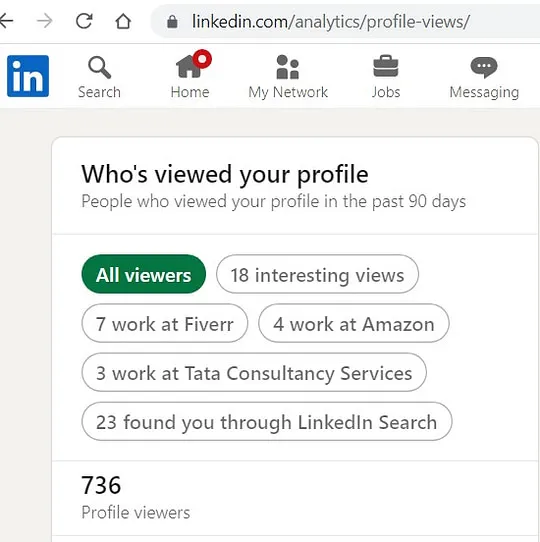
LinkedIn is the professional networking site where job seekers, employers, and industry professionals converge to build connections. One of the fascinating features of LinkedIn is the ability to see who has viewed your profile. But what does this mean for both employers and job seekers? Let's dive in.
When you browse through LinkedIn profiles, your activity can reveal a lot about your intentions. If you're a job seeker, viewing potential employers' profiles might signal to them that you're interested in their company or a specific role. However, on the flip side, employers also have the ability to track who’s checking them out.
Here's a quick breakdown of the advantages to profile views:
- Networking Opportunities: Both job seekers and employers can facilitate connections based on mutual interest.
- Insightful Analytics: Users can gauge interest in their profile or company based on how many views they receive.
- Increased Visibility: Frequent profile views can improve your visibility on the platform, especially if you engage with content.
In essence, understanding LinkedIn profile views can empower both parties to make informed decisions about their networking strategies.
How LinkedIn Profile Viewing Works
LinkedIn uses a unique system to manage profile views, and understanding it can help you navigate the platform more effectively. When you visit someone's profile on LinkedIn, several things happen behind the scenes that may surprise you!
For starters, when a user views another profile, LinkedIn logs this activity. Here’s how it works:
- Profile View Count: Each member can access a “Who’s Viewed Your Profile” section that shows the number of views and details about the viewers, based on their privacy settings.
- Visibility Settings: Users can select between three visibility modes:
- Public Profile: Your name and headline are visible to the person being viewed.
- Private Mode: Your identity remains completely hidden when you view someone’s profile.
- Semi-Private Mode: Only your job title and industry are shown without revealing your name.
Employers can use this feature strategically to determine interest in their company, while job seekers might want to be aware of their own profile visibility. It’s a delicate balance between marketing oneself and maintaining privacy.
Remember, if you're viewing a profile in private mode, you won’t be able to see who views your profile either—it's a two-way street!
This understanding of LinkedIn’s profile viewing mechanics can help you navigate the platform with confidence, whether you’re scouting for talent or scouting potential employers.
Also Read This: How to Make Your Behance Portfolio Private
Who Can See Your Profile Views
When you hop onto LinkedIn, eager to connect and network, one question that often tickles the back of your mind is: "Who can see that I viewed their profile?" Well, it’s a bit of a mixed bag, and it really depends on what both you and the person you’re checking out have set in your privacy preferences.
Here's a quick breakdown of how it works:
- Basic Model: If you check out someone's profile and you're using a standard account with default settings, they will see you as a viewer. Typically, your name, headline, and location will be visible.
- Anonymous Browsing: Want to fly under the radar? You can choose to browse profiles anonymously. This means you can check out others without them knowing it was you. However, in doing so, you also won’t see who views your profile.
- Premium Features: If you’re a LinkedIn Premium member, you can see a list of everyone who’s viewed your profile, provided they don’t have their settings set to anonymous. It’s like being part of an exclusive club!
- Reciprocity: It’s worth noting that if someone views your profile and you’ve set yours to show viewers, you may also appear in their "Who Viewed Your Profile" section.
In summary, if you’re curious about who can see your profile visits, it’s crucial to understand your privacy settings; the same goes for the profiles you view. Tailoring your settings can help you maintain the level of visibility and anonymity that suits your networking style.
Also Read This: Craft a Stunning Origami Diamond: Step-by-Step on Dailymotion
Employer Settings and Privacy Controls
Now, when it comes to employers, things can get a little more specific. Many recruiters and hiring managers utilize LinkedIn to scout potential hires, and they often want to see who’s engaging with their profiles. But just like regular users, employers also have a set of privacy controls they can exploit, making the viewing experience uniquely tailored.
Here’s how employer settings can affect your profile views:
| Setting | Description |
|---|---|
| Visible Profile Views | Employers can see who has viewed their profile if they haven’t chosen an anonymous mode. This allows them to gauge interest from potential candidates. |
| Tracking Who Viewed Your Job Postings | Employers can track which members view their job postings. This data can be extremely useful for understanding the effectiveness of their listings. |
| Recruiter Accounts | Employers with LinkedIn Recruiter accounts have even more detailed analytics about profile views and candidate interactions, allowing comprehensive insight. |
For job seekers, being aware of these employer settings is crucial. If you're checking out a company before applying, consider whether you want to signal your interest by making your profile visible or maintain a low profile until you're ready to take the plunge.
In the end, it’s all about striking a balance between being proactive in your job search and the level of privacy you wish to maintain on this professional platform.
Also Read This: Effective Strategies to Boost Your Bowling Speed in Cricket
Anonymous Browsing Options
If you're concerned about your privacy while exploring potential job opportunities or checking out a company, LinkedIn does offer some handy anonymous browsing options. These features can help you keep your profile views under wraps, so you can research without the fear of being noticed. Let's dive into what you can do:
When you browse profiles anonymously, your name won’t appear in the 'Who's viewed your profile' section of other users' accounts. Here's how you can activate this feature:
- Go to your LinkedIn account and click on "Me" at the top of your homepage.
- Select "Settings & Privacy".
- Under the "Visibility" tab, look for the "Profile viewing options".
- Choose “Anonymous LinkedIn Member” or “Private profile characteristics” to hide your identity.
It’s worth noting, though, that when you use anonymous browsing, there’s a catch: you won’t be able to see who has viewed your profile either. It’s a bit of a trade-off!
Additionally, you can consider other options such as adjusting your profile visibility settings for specific connections. While you’re lurking around checking out your future employer, remember:
- Use discretion: Anonymity can be a double-edged sword; tread lightly.
- Be transparent: If you’re actively looking for a job, consider being open about it.
So, while LinkedIn gives you the street to walk anonymously, always weigh the pros and cons of going incognito!
Implications of Viewing Employer Profiles
Now that we’ve covered how to browse anonymously on LinkedIn, let’s talk about the implications of viewing employer profiles, particularly if you're contemplating a job switch. Understanding these implications can help you navigate your job search more effectively.
When you view an employer’s LinkedIn profile, here’s what you should keep in mind:
- Potential Interest Signal: Employers might interpret your profile view as a sign of interest in the company. This could lead to unsolicited messages from recruiters or even your future boss!
- Networking Opportunities: Viewing an employer's profile can open the door for networking. You might find mutual connections that could help you secure a referral.
- Company Insights: Analyzing an employer’s profile can give you insights into their company culture, values, and employee experiences. You might discover if they are a good fit for you.
It’s essential to ponder these implications. Here’s a quick table to summarize:
| Implication | Pros | Cons |
|---|---|---|
| Potential Interest Signal | Can lead to job opportunities | May make you feel monitored |
| Networking Opportunities | Build connections | Could require more networking effort |
| Company Insights | Inform your job search | Misinterpretation of intentions |
In conclusion, while viewing employer profiles on LinkedIn can have some strategic benefits, it’s essential to navigate this with a bit of caution. The way you approach this can influence your job search in more ways than you might expect!