

In today’s competitive job market, every detail on your LinkedIn profile matters. When it comes to your education section, adding a minor can significantly enhance your profile. It not only showcases your diverse academic interests but also highlights additional skills that can set you apart from other candidates. Let’s dive into why including a minor is a smart move for your LinkedIn presence.
Why It's Important to Include a Minor
Including a minor in your LinkedIn education section serves multiple purposes that can greatly benefit your professional image. Here are some compelling reasons to consider:
- Demonstrates Broader Knowledge: A minor reflects an additional layer of expertise. For instance, if your major is in Business Administration and you have a minor in Psychology, it shows potential employers that you understand human behavior, which is essential in fields like marketing and management.
- Enhances Your Skill Set: Your minor can add valuable skills that are relevant to your desired job role. For example, a minor in Computer Science while majoring in Graphic Design can showcase your technical prowess in digital design.
- Appeals to Diverse Industries: Including a minor can make you attractive to a wider range of industries. A minor in Environmental Studies could make you a valuable candidate for roles in sustainability-focused companies, regardless of your major.
Adding a minor to your LinkedIn education section is not just about filling space; it’s about crafting a narrative that highlights your unique qualifications. Remember, the goal is to present yourself as a well-rounded candidate who brings more to the table than just a single field of study.
Also Read This: Can Premium LinkedIn Users View Anonymous Profile Visitors
Steps to Add a Minor to Your LinkedIn Profile
Adding a minor to your LinkedIn profile can enhance your academic credentials and showcase your diverse skill set. Here’s a simple guide to help you do just that:
- Log into Your LinkedIn Account: Start by signing into your LinkedIn account. If you don’t have an account, you’ll need to create one.
- Navigate to Your Profile: Click on your profile picture or the “Me” icon at the top of your LinkedIn homepage to access your profile.
- Click on “Add Profile Section”: Look for the “Add profile section” button, usually located under your profile picture. Click on it.
- Select “Education”: From the dropdown menu, select “Education.” This will allow you to add or edit your educational details.
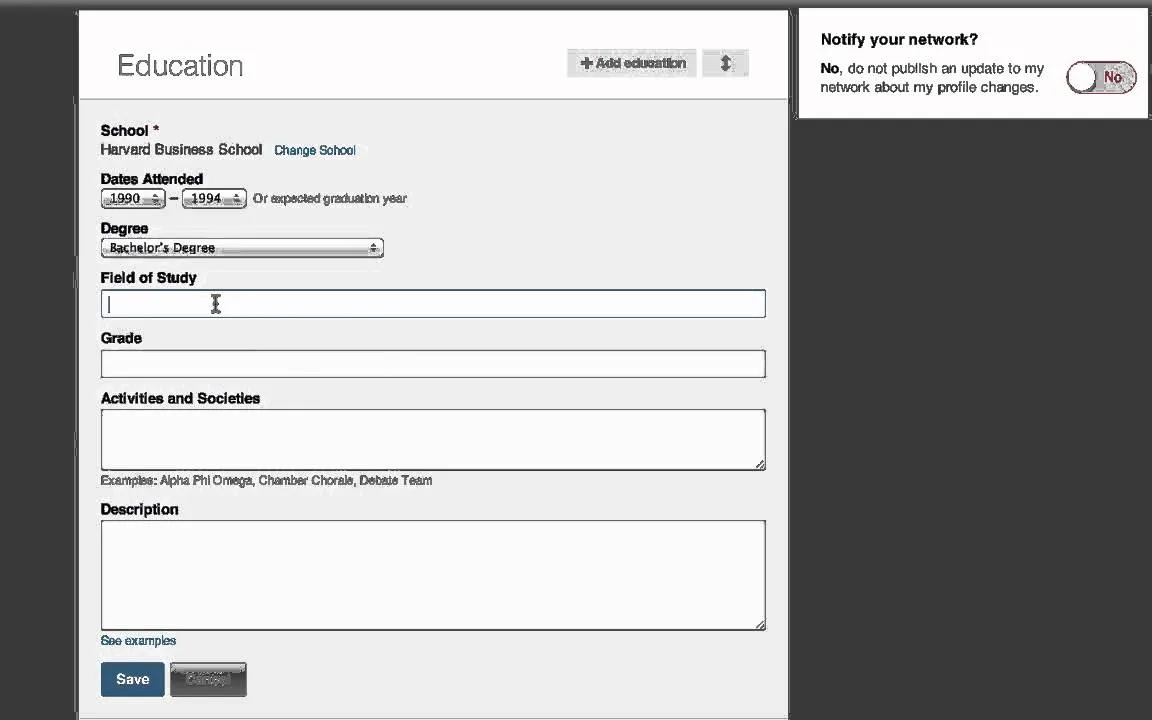
- Find Your Degree: If your degree is already listed, click the pencil icon to edit. If not, click “Add education” to create a new entry.
- Add Your Minor: In the “Field of study” section, include your minor alongside your major. For example, if your major is Psychology and your minor is Sociology, you can write it as “Psychology, Minor in Sociology.”
- Save Changes: After entering the details, don’t forget to click “Save” to ensure your changes are reflected on your profile.
And there you go! Your minor is now a part of your LinkedIn story, ready to impress potential employers.
Also Read This: Design Slides Using Canvas Slide Template
Tips for Highlighting Your Minor Effectively
Highlighting your minor on LinkedIn can make your profile stand out. Here are some tips to effectively showcase this aspect of your education:
- Use Keywords: Include relevant keywords associated with your minor in your profile summary or experience sections. For instance, if your minor is in Environmental Science, mention it in contexts related to sustainability.
- Showcase Projects: If you completed any projects or coursework related to your minor, list them in the experience section. This provides tangible evidence of your skills.
- Engage with Related Content: Share articles or posts related to your minor. This not only shows expertise but also keeps your profile active.
- Network with Peers: Connect with classmates or professionals in your minor field. Their endorsements can add credibility to your profile.
- Join Relevant Groups: Participate in LinkedIn groups related to your minor. Engaging in discussions can highlight your interest and knowledge in that area.
By implementing these tips, you can effectively draw attention to your minor and enhance your overall LinkedIn presence!
Also Read This: Integrating SMS Services with Fortiguard Downloader
Common Mistakes to Avoid
When adding a minor to your LinkedIn education section, it's essential to steer clear of common pitfalls that can undermine your profile's effectiveness. Here are some top mistakes to avoid:
- Inaccurate Information: Double-check the details of your minor. Incorrect names or dates can mislead potential employers. Always verify the official title and the duration of your study.
- Neglecting to Explain the Relevance: Don't just list your minor; explain how it complements your major or enhances your skills. For instance, if your major is Business Administration and your minor is Marketing, highlight how this combination prepares you for roles that require both strategic and creative thinking.
- Overloading Your Profile: Be concise. If you have multiple minors or significant achievements, prioritize the most relevant ones. Too much information can overwhelm viewers.
- Ignoring Formatting: Inconsistent formatting can distract from your professional image. Use bullet points for clarity and maintain a uniform style throughout your profile.
- Leaving Out Experiences: If your minor involved projects, internships, or relevant coursework, include these experiences. They showcase your practical application of knowledge and make your profile more compelling.
Avoiding these mistakes will help you present a polished and professional LinkedIn profile that accurately reflects your educational background and enhances your job prospects.
Conclusion
Adding a minor to your LinkedIn education section can significantly boost your profile, showcasing your diverse skill set and academic commitment. By following the best practices discussed and avoiding common mistakes, you can create a compelling narrative that resonates with potential employers.
Remember, your LinkedIn profile is often the first impression you make in a professional context. Make it count! Here’s a quick recap of what to keep in mind:
- Highlight Relevance: Clearly connect your minor to your career goals.
- Be Specific: Provide accurate information and details about your coursework and projects.
- Keep It Professional: Ensure your profile is well-formatted and free from errors.
Ultimately, a thoughtfully crafted education section can demonstrate your unique qualifications and help differentiate you in a competitive job market. So, take the time to showcase your minor effectively, and let your LinkedIn profile reflect all the hard work you've put into your education!