
In the age of digital communication, privacy is a hot topic, and Telegram stands out as a popular messaging app known for its robust privacy features. Understanding how to navigate these settings is key to ensuring your personal information stays secure. Whether you’re new to Telegram or a seasoned user, knowing how to manage your privacy settings can make all the difference in your online experience.
Understanding Phone Number Visibility
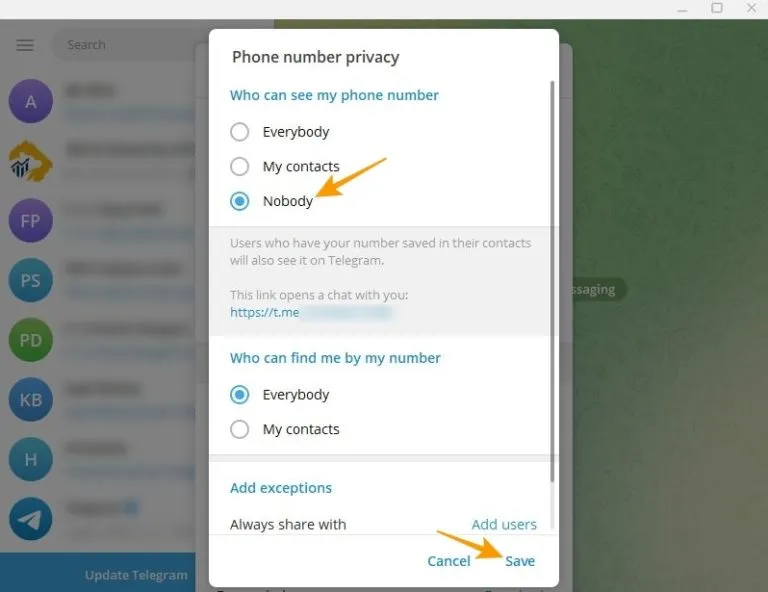
Your phone number is often a vital piece of personal information, and Telegram gives you various options to control who can see it. Here’s a breakdown of how it works:
- Default Settings: When you create a Telegram account, your phone number is linked to your profile. By default, anyone who has your number saved in their contacts can find you on Telegram.
- Privacy Settings: You can customize who sees your phone number by going to Settings > Privacy and Security. There, you can choose from the following options:
- Everyone: All Telegram users can see your phone number.
- My Contacts: Only those in your contact list can view your number.
- Nobody: No one will be able to see your phone number, even if they have your contact saved.
- Anonymous Contacts: If you prefer more anonymity, you can opt to share your username instead of your phone number. This way, people can find you without seeing your personal info.
- Blocking Contacts: If you wish to limit visibility further, you can block specific users from seeing your phone number, ensuring your privacy is upheld.
By taking the time to adjust these settings, you can enjoy a safer and more private messaging experience on Telegram. Remember, staying proactive about your privacy is always a smart choice!
How to Control Your Phone Number Privacy
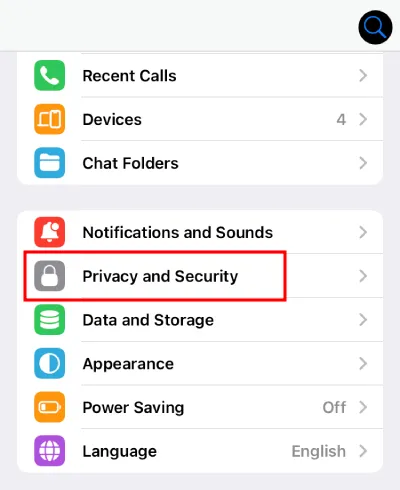
Understanding how to manage your phone number privacy on Telegram is essential, especially if you’re concerned about who can access your personal information. Fortunately, Telegram offers several settings that empower you to control who sees your phone number. Here’s how to tweak those settings:
- Access Privacy Settings: Open the Telegram app and navigate to Settings by tapping on the three horizontal lines in the top left corner. From there, select Privacy and Security.
- Phone Number Visibility: In the privacy options, you’ll find the Phone Number section. Here, you can choose from three options:
- Everybody: Anyone can see your phone number.
- My Contacts: Only your saved contacts can view your number.
- No One: No one can see your number, not even your contacts.
- Block Specific Contacts: If there are certain individuals you want to restrict from seeing your number, you can add them to the Blocked Users list.
- Use a Username: Consider using a username instead of your phone number for public interactions. This allows others to find you without needing your personal phone number.
By following these steps, you can take control of who has access to your phone number on Telegram, enhancing your overall privacy experience.
Implications of Sharing Your Phone Number
Sharing your phone number on Telegram—or any platform, for that matter—comes with several implications that you should consider carefully. Here are the key points to keep in mind:
- Increased Vulnerability: Once your phone number is shared, it can be used to track or identify you. This could lead to unwanted contact or harassment.
- Privacy Risks: Sharing your number might expose you to spam calls or messages, especially if your number is leaked to third-party services.
- Compromised Security: If someone gains access to your phone number, they could potentially reset passwords for your other accounts, putting you at risk of identity theft.
- Limited Control: Once a number is shared, you have limited control over who retains it. Even if you block someone, they already have your number saved.
- Trust Issues: Sharing your number can lead to trust complications in relationships. People may expect more immediate communication, which can feel intrusive.
Overall, think twice before sharing your phone number. Weigh the benefits against potential risks to ensure your privacy remains intact.
5. Alternatives to Using Your Phone Number on Telegram
If you’re concerned about privacy and want to avoid sharing your phone number on Telegram, you’re in luck! There are several alternatives that allow you to maintain your anonymity while still enjoying the platform’s features. Here’s a closer look at some of these options:
- Username: Telegram allows you to create a unique username that others can use to find you without needing your phone number. This is an easy way to connect with friends or join groups while keeping your number private.
- Invite Links: You can create invite links for groups or channels you manage. This allows others to join without needing your phone number, making it a great way to keep your identity guarded.
- Using a Temporary Number: Services like Google Voice or apps like TextNow provide temporary phone numbers. You can register your Telegram account using one of these numbers, allowing you to communicate without revealing your real number.
- Anonymous Accounts: Some users opt to create accounts with pseudonyms or fictional names. This helps obscure your identity while chatting or joining public groups.
- Telegram Bots: You can interact with bots for various purposes (like feedback or notifications) without sharing personal contact information, keeping your interactions private.
By utilizing these alternatives, you can enjoy Telegram’s features while safeguarding your personal information. It’s about finding the balance between connectivity and privacy!
6. Conclusion: Protecting Your Privacy on Telegram
In today’s digital age, privacy is paramount, especially on messaging platforms like Telegram. While Telegram offers robust security features, it’s essential to be proactive in protecting your personal information. Here are some key takeaways:
- Understand Privacy Settings: Take time to explore Telegram’s privacy settings. You can control who can see your phone number, profile picture, and online status. Adjust these settings to ensure only trusted contacts have access to your information.
- Use a Username: Opting for a username instead of your phone number can significantly enhance your privacy. It allows you to remain reachable without exposing personal details.
- Be Wary of Public Groups: Joining public groups can expose you to a wider audience. Always assess the group’s reputation and avoid sharing sensitive information.
- Stay Updated: Keep an eye on Telegram’s updates regarding new privacy features and potential vulnerabilities. Being informed helps you adapt your privacy measures accordingly.
- Educate Yourself: Familiarize yourself with the basics of cyber privacy. Knowledge is power when it comes to protecting your personal information online.
Ultimately, Telegram can be a safe space for communication if you take the necessary precautions. Embrace these strategies, and you can enjoy the platform while keeping your privacy intact!